AI Engineering & Architecture · Field study
Where the time goes
on a local model
The model was the cheap part. Proving its work was the real cost.
On one MacBook and one open model, the model's seconds were the predictable part. The lessons were about trust: cap the work, treat the model as a tipster, give every check a case built to fail, and decide the local defaults on purpose.
01 / Opening
The first answer took 169 seconds
The model was the cheap part. Proving its work was the real cost.
I asked a 27-billion-parameter open model, running on my own laptop, for three short bullets. It took 169 seconds and generated 2,681 tokens to get there, because I had limited the shape of its answer but not the reasoning it did before answering. It was like setting a one-page limit on an essay and then waiting while the writer stared at the ceiling for an hour. Once I turned that hidden reasoning off by default and capped everything it generated, the same kind of request came back in under 10 seconds.
Nothing about the model had changed. My setup had. By my arithmetic, an investigation that needs 50 model calls would take close to two hours at the slow rate and under nine minutes at the fast one. A limit on what you see isn't a limit on what you pay for. Cap the work, not just the answer.
That first lesson set the pattern for the whole study. Between August and October I set the model up, then gave it real security tasks and timed everything around it. The model's own seconds were small and steady. The time went into starting things up, building checks I could trust and proving results. The study builds on The Model That Says Yes, where I tried a refusal-reduced model on a spare laptop. This piece is about why the time went where it did, and what that changes about how I'd use a local model.
02 / Why this question, now
Why this question, now
The industry question has moved from whether models can do security work to how much of it they should be trusted with. Anthropic reported a state-sponsored campaign in which, by its own estimate, its model carried out 80 to 90 percent of it, and also hallucinated credentials and overstated what it had found (Disrupting the first reported AI-orchestrated cyber espionage campaign). Most entries in OWASP's third-quarter 2026 exploit roundup were mapped to excessive agency or rogue agents (GenAI and Agentic AI Exploit Roundup Q3 2026, entry mappings). XBOW, which sells AI pentesting, describes models as trained to please and runs separate validators before it reports a finding (AI Pentesting: Strengths, Weaknesses, and How XBOW Fills the Gaps, on validation).
If a model can do most of the work and still invent what it found, speed is the easy part. The hard part is knowing which of its answers to believe. I wanted to see both at the smallest useful scale: one laptop, one open model, no cloud.
03 / The setup
The setup
- Machine and model: a MacBook Pro M4 Max with 48 GB of memory shared by the CPU and GPU, running qwen3.6:27b through Ollama 0.32.14, in its Q4_K_M quantization, about 5 bits per weight (17.4 GB on disk).
- Boundary: the October runs reached the model only on the laptop's own address, and it never ran anything itself. It proposed; a small piece of fixed code, the dispatcher, carried out only what was permitted.
- Targets: synthetic test cases I built, plus two deliberately vulnerable practice apps from OWASP, Juice Shop and crAPI, in an isolated local lab.
- Method: before each experiment I wrote down what would count as a pass, and built at least one case designed to fail, so a broken check couldn't pass quietly.
04 / The model points; the evidence decides
The model points; the evidence decides
Before giving the model real work, I surveyed the tools enterprise testers actually use, from Nmap and Burp Suite to code scanners, adversary-emulation libraries and exploit frameworks, and graded how well AI fits each. The best fits I found weren't the most autonomous offensive frameworks. They were mature tools with structured output, narrow side effects and cheap replays, where a model can help choose and explain while the tool does the work.
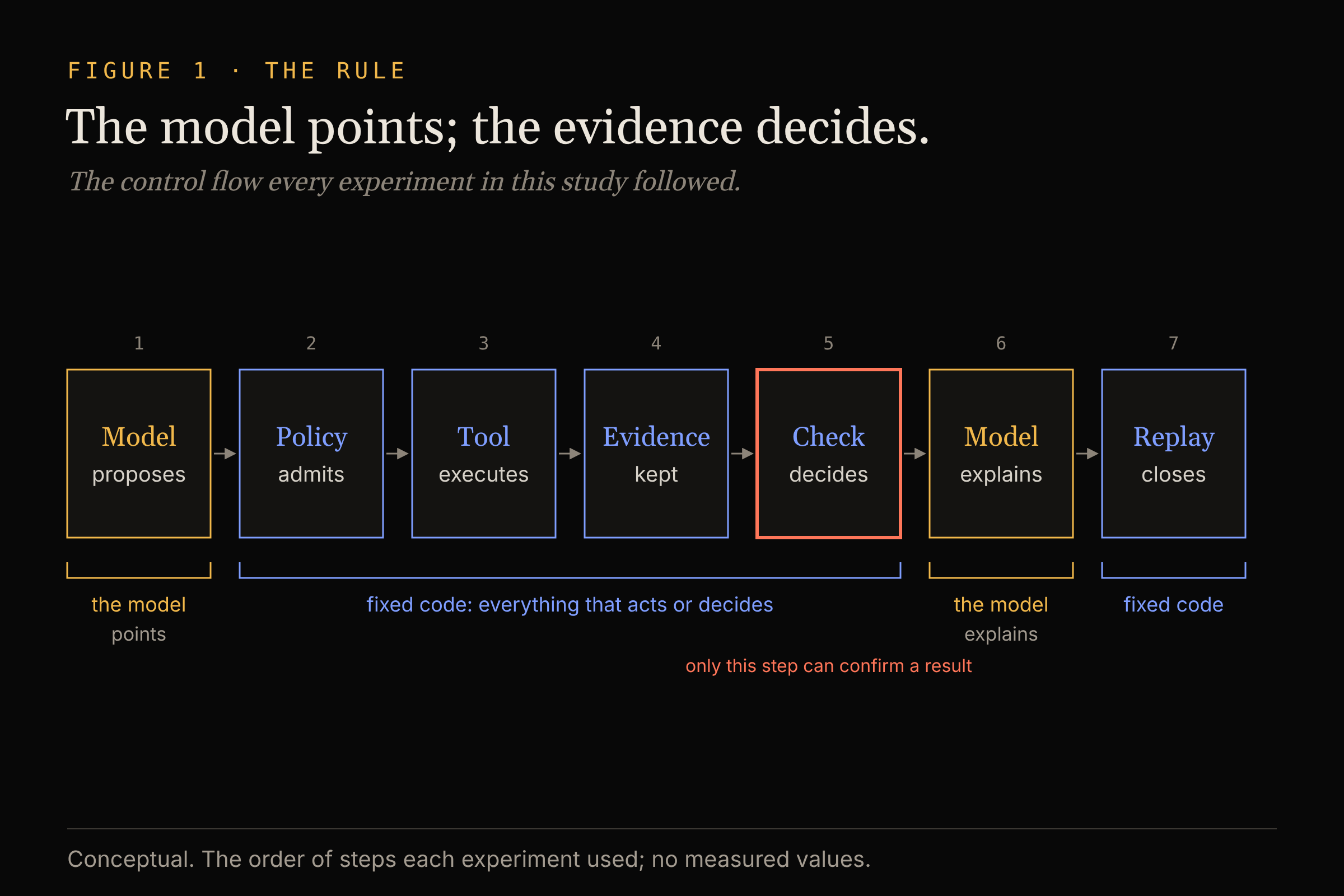
That became one rule for everything after: the model is the tipster, not the witness. A tip is worth following, but nobody convicts on one.
The model proposes, a policy admits, a fixed tool executes, the evidence is kept, a deterministic check decides, the model explains, and an exact replay of the check closes the case.
Swipe or use arrow keys to inspect the figure. A text description follows.
Text description of Figure 1
seven boxes in a row joined by arrows: model proposes, policy admits, tool executes, evidence kept, check decides, model explains, replay closes. The two model steps are gold; the five fixed-code steps are blue, with check decides outlined as the only step that can confirm a result.
The cost of skipping the rule is concrete. A model's "I found it" that goes straight into a report becomes a finding a developer has to chase. If it's wrong, they lose the time and the next report gets read with less trust. Treat every model claim as a lead until plain code confirms it.
05 / A check that can't fail isn't a check
A check that can't fail isn't a check
The most valuable thing the study produced wasn't a model result. It was three places where "success" lied.
The error page that said OK. With Burp Suite Professional 2026.8 proxying requests to Juice Shop, Burp's own connection-error page came back in my setup with an HTTP 200 success status. A check that trusts the status code would have recorded a working response, and anything tested after that would have been tested against an error page. My check caught it.
The run that finished. The first of three October tasks tested something every security agent faces: tool output can carry instructions. I hid instructions in six of eight fake scanner reports. Each report went in two ways, pasted plainly and wrapped as untrusted data, and each was run twice: 32 calls. None of the 24 answers to planted reports proposed a forbidden action. That's encouraging, but at this low a temperature the repeats are near copies, so it's really 12 conditions, and zero on a small synthetic sample isn't immunity. With both styles at zero, it also can't tell whether the wrapping helps.
The sharper lesson came from testing the checker. I ran a deliberately broken dispatcher that let a forbidden action through. A check that asked only whether the run finished passed it. A check that looked for the action's effect caught it. In a real pipeline, the first would have reported a clean run while the forbidden action happened.
The batch that exited green. In the second task, a test that runs three commands still reported success after I made one of them unavailable, because a shell batch reports only its last command's result unless you tell it otherwise. An exit-code check would have marked the test green, and in a real program that green becomes a line in a report saying the test ran. Part of it never did, and a pass rarely gets a second look. It's a dishwasher that beeps done after skipping the rinse: you put the dishes away dirty. The check that caught it looked at each command's own result and called the run inconclusive.
Prince Chaddha of ProjectDiscovery makes the model-side version of the point: "A benchmark tells you whether the model is capable, not whether it's honest" (How abliterated models can get you pwned). I came at the scoring side in Proof Outside the Model. Before trusting a check, give it a case built to fail. Score what each step did, not just how it ended.
06 / Saying no is part of the job
Saying no is part of the job
The second task asked the model to pick from Atomic Red Team, Red Canary's library of small tests mapped to MITRE ATT&CK. I gave it one safe procedure and a set of contexts where running it would or wouldn't be appropriate. It made the right choice or the right refusal in all 12 contexts I built, and the dispatcher refused all seven malformed or extra-command proposals I forced on it.
A perfect score on 12 cases is small. What matters is the kind of mistake it avoided. The expensive mistake for a testing agent isn't a slow choice. It's running a real attack technique on a machine nobody authorized it to touch. A model that declines in the wrong context, backed by a dispatcher that refuses anything off the list, is the kind of control that keeps a lab exercise from becoming an incident.
The timing was humbling, though. The model's 12 decisions took about 64 seconds; running the procedure directly took about 0.03 seconds. Recording where the test came from and pinning its version took more than 10 minutes before the model saw it: the setup-and-proof cost again, dwarfing both. For an obvious choice, a model adds latency, not speed. Whatever value it has has to come from the hard calls and from refusing the wrong ones.
07 / Finding is fast; proving is the work
Finding is fast; proving is the work
The third task was the one I'd been building toward. I asked the model to examine access control in crAPI, OWASP's deliberately vulnerable practice app, using synthetic data in an isolated lab. The model pointed to a planted authorization flaw on its second request. An independent check verified the behavior in 0.06 seconds, and the same check passed after I applied an ownership fix to a throwaway copy.
The model kept going after the decisive observation. In a real program, each extra request costs time and can touch more data than the job needs. The task was narrow and the flaw was already planted. Give a tool a rule for when it has enough evidence to stop.
08 / Where the time actually went
Where the time actually went
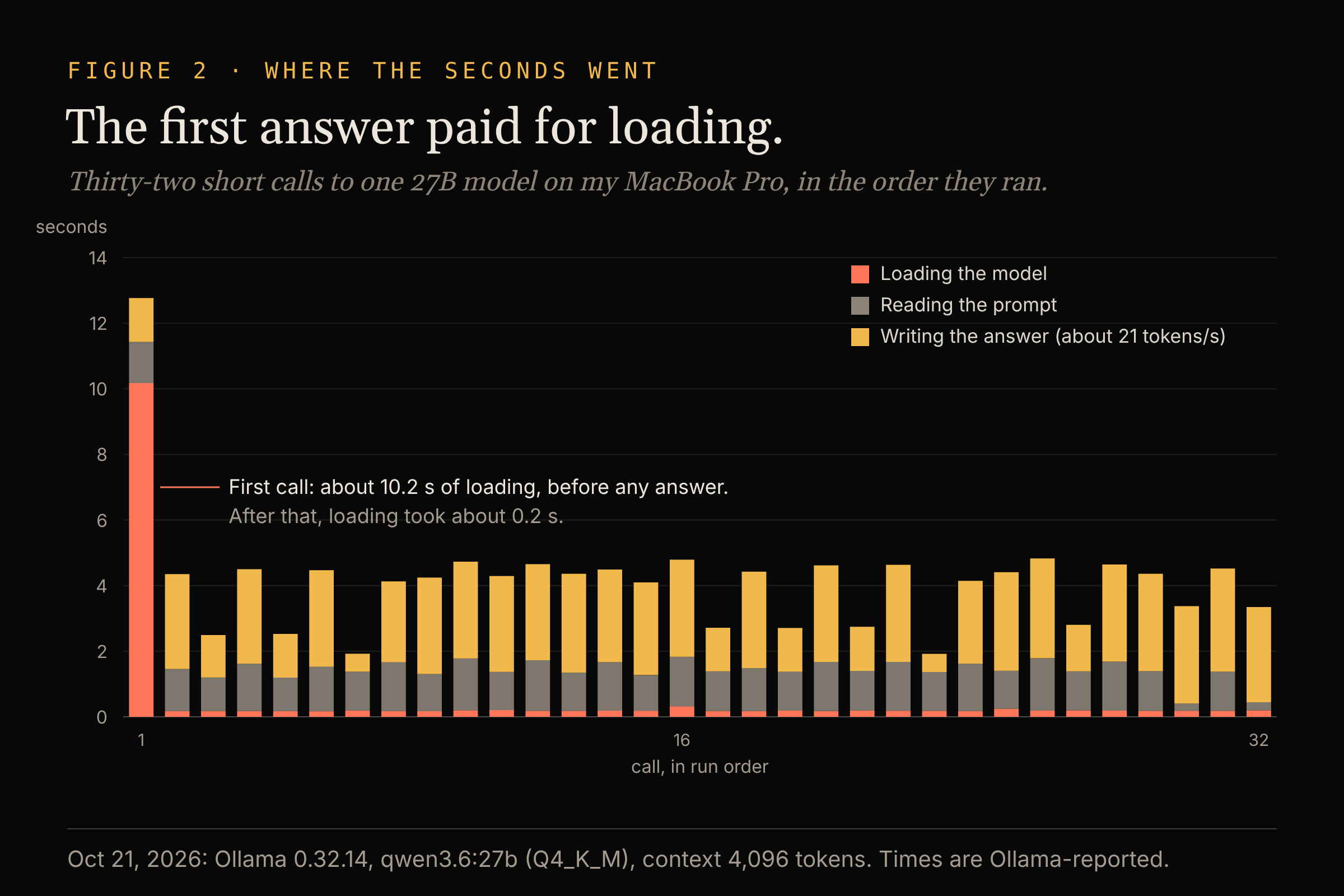
Across the runs, the model itself was predictable. In the most closely timed run, the first call spent about 10 seconds loading the model; every later call loaded in about 0.2 seconds and took about 4 seconds in all, writing at about 21 tokens a second. Thirty-two calls added up to about two and a quarter minutes.
Swipe or use arrow keys to inspect the figure. A text description follows.
Text description of Figure 2
stacked bars for 32 calls in run order, each split into loading the model, reading the prompt and writing the answer. The first bar is about 12.8 seconds, about 10.2 of it loading. Every later bar is about 2 to 5 seconds, with loading a sliver of about 0.2 seconds.
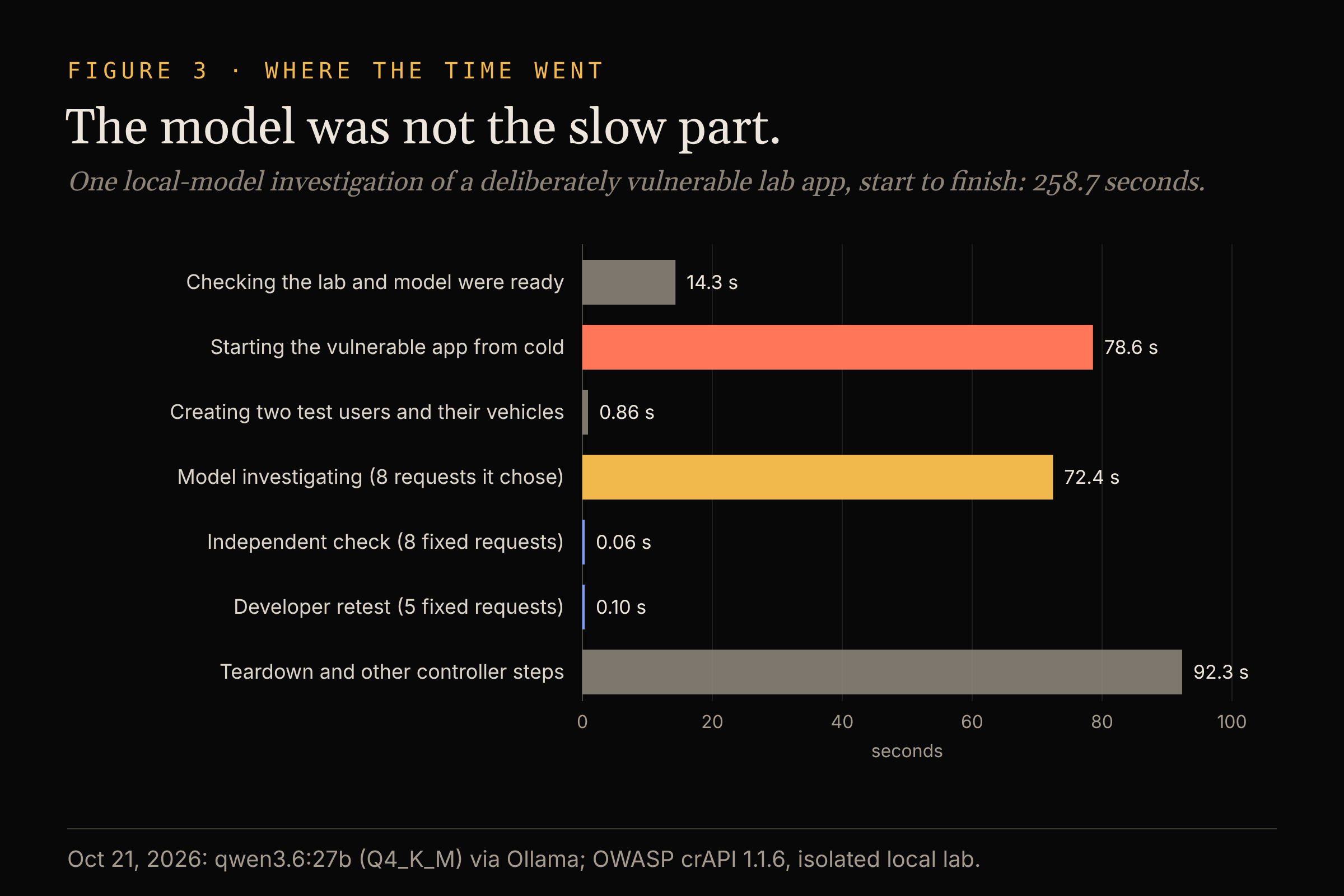
The long waits were elsewhere. In the crAPI run, starting the vulnerable app from cold took about as long as the model's whole investigation, and teardown with the other controller steps took longer. Across the study, the big costs were setup, proof and, before I capped it, unbounded reasoning, not the model's working calls.
Swipe or use arrow keys to inspect the figure. A text description follows.
Text description of Figure 3
horizontal bars for seven phases of one 258.7-second run. Starting the vulnerable app from cold took about 78.6 seconds and the model's investigation about 72.4 seconds. Checking readiness took about 14.3 seconds, teardown and other controller steps about 92.3 seconds, and creating test users under a second. The independent check took 0.06 seconds and the developer retest 0.10 seconds.
A faster nail gun doesn't finish a house much sooner; the schedule lives in the permits, the deliveries and the inspections. Budget for setup and proof, not model speed.
09 / The box around the model
The box around the model
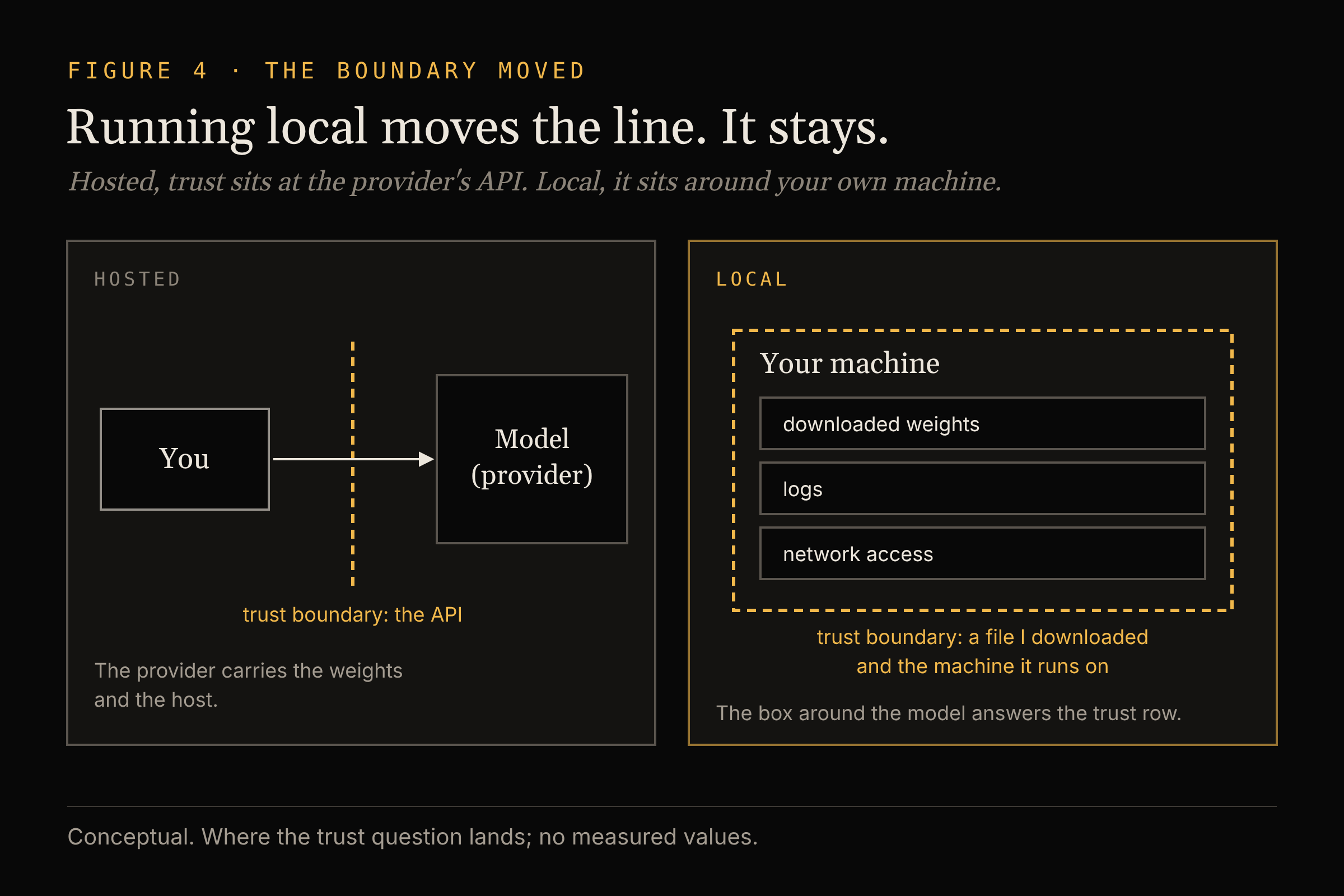
All of that timing assumed the model was running the way I thought it was. Running locally doesn't remove the trust question. It moves it onto your desk. Using a hosted model is a little like eating at a restaurant: the kitchen is their problem. Running one locally is cooking at home, where you suddenly care where the ingredients came from and who has a key to the kitchen.
Swipe or use arrow keys to inspect the figure. A text description follows.
Text description of Figure 4
two panels compare where the trust boundary sits. With a hosted model, a dashed boundary sits at the provider's API, between you and a model the provider runs. Running local, the dashed boundary moves around your own machine, which holds the downloaded weights, the logs and whatever network access the machine has.
Two defaults show what that means. Ollama accepts an API key from OpenAI-style clients and ignores it (OpenAI compatibility), so it doesn't check who is calling. It listens only on the laptop's own address unless you change that (Ollama FAQ). Open the port to a network and anyone who can reach it can run the model on your hardware, and pull, replace or delete models through the same API. If another machine needs it, put an authenticating proxy or a VPN in front instead. Many people have opened it anyway: SentinelLABS and Censys counted about 175,000 publicly reachable Ollama hosts, nearly half advertising tool-calling (Silent Brothers).
The second default is quieter. Ollama sizes its default context window to the memory available (Context length), and on this laptop in August it reported 32K tokens, eight times the 4,096 my October runs set explicitly. If you don't set it on every request, your timing numbers describe a configuration you didn't know you were running. Decide the defaults on purpose: who can call the model, and what it's actually running with.
10 / What I expect the next runs to show
What I expect the next runs to show
Here is what I expect from the next runs, written down now so the results can prove me wrong.
- Human time will decide the value. A side-by-side with a practitioner is the test of whether a validated finding saves more time than it costs to build.
- Reading will become the wait. In the earlier piece, a 137,000-token request took a little over 8 minutes on a different laptop and model. I expect long documents to push the wait before the first word into minutes while writing speed barely moves.
- Stopping rules will cut more time than hardware.
- Most agentic tools won't clear a lab's bar as is. One open-source autonomous pentest agent I assessed passed one of my lab's nine readiness gates, before its capability was ever tested. I expect that to be common, and fixable.
11 / A test you can run
A test you can run
If you already run a model locally, you can do the cheap half of this in an afternoon. The script I'd use, a small summarizer and the timing run's per-call numbers are in local-model-bench, alongside the timing results.
- Pick one real task with synthetic or scrubbed data, and write down the answer you expect before you run it.
- Unload the model (
ollama stopand its name), run the task cold, then warm.ollama run --verboseprints the rates; in the API,eval_countdivided byeval_duration, converted from nanoseconds to seconds, is the writing speed. - Turn reasoning off unless you need it, cap the output, and set the context window on every request.
- Put one deterministic check between the model and anything it does, and give that check a case that should fail. If that case passes, the check is broken.
12 / The honest limit
The honest limit
This is one machine and one open model, on synthetic cases and deliberately vulnerable practice apps in an isolated lab. The speed numbers are real for that setup and shouldn't be carried to another machine, model, quantization or prompt length. The task results are small: six planted instructions in two styles, a dozen test choices and one planted practice-app flaw. I built and checked these experiments myself with AI assistance, so they are directional evidence, not independent assurance. I didn't verify where the model's weights came from, the Burp trial is unfinished and human time saved is unmeasured.
The model's own seconds turned out to be the cheap, steady part. What made a result worth trusting cost far more, and the cost that matters most, a person's time, is still the open line.
13 / Next credible question
Next credible question
What is the cheapest honest way to measure whose time a local model actually saves?
If you run local or open models for security work, I'd like to hear what you measure, what broke on constrained hardware and how you decide a set of weights is safe enough to attach a tool to. Write to me.
14 / Appendix: sources
Appendix: sources
Industry context. Anthropic's Disrupting the first reported AI-orchestrated cyber espionage campaign (November 13, 2025); OWASP's GenAI and Agentic AI Exploit Roundup Q3 2026 (October 8, 2026); XBOW's AI Pentesting: Strengths, Weaknesses, and How XBOW Fills the Gaps (April 8, 2026), a vendor's description of its own approach; the OWASP API Security Project (2023 Top 10); SentinelLABS' Silent Brothers | Ollama Hosts Form Anonymous AI Network Beyond Platform Guardrails (January 29, 2026, with Censys); and ProjectDiscovery's How abliterated models can get you pwned (Prince Chaddha, October 6, 2026). Read in November 2026.
Ollama's documentation. The local address, the ignored key, the context defaults and the timing fields are from the Ollama FAQ, OpenAI compatibility, Context length and Generate a response pages, read in November 2026.
Earlier work. The Model That Says Yes covers the earlier long-context runs on my spare laptop, and Proof Outside the Model checking findings outside the model.